Total Pageviews

Showing posts with label Optimization. Show all posts

Tuesday, January 28, 2014

Database optimization - the missing step

Does your intelligence or your magical database optimization scripts really optimize the database? The traditional wisdom is to optimize indexes and statistics, but how about optimizing a HEAP (a table without clustered index) by removing fragmentation in your database?

Database optimization, more precisely Index optimization is one of the major tasks every DBA performs on a regular basis regardless the size of the database. Based on daily data changes and fragmentation threshold, DBA decides to optimize indexes such as REBUILD, RE-ORGANIZE.

Free automated script:
A lot of automated index optimization scripts are freely available to help improve your database performance. But if you carefully review these index optimization statements, you will discover that those scripts cautiously avoid optimizing HEAP. If so, then your database is not fully optimized.

Generally, if a HEAP table is part of the OLTP system, then it is highly recommended that it should be clustered. However, there are business logic, reasons and mistakes as well to not create clustered Index on a table and keep the table as a HEAP. As a result, executing queries against these tables become very resource intensive.

Starting form SQL 2008, a HEAP can be optimized as well with the “ALTER TABLE <xxxxx> REBUILD” option. Therefore, to optimize a HEAP we no longer need to create a clustered index and dropping it afterward.

Key points to remember:
1.      If the HEAP contains non-clustered indexes, all indexes will be rebuilt (dropped and recreated).
2.      Fill Factor can’t be set on a HEAP.
3.      All or a specific partition can be optimized.
4.      Data compression (PAGE or ROW level) can be set or changed.

Script to check HEAP fragmentation:
select  o.name ,
        ips.index_type_desc ,
        ips.avg_fragmentation_in_percent ,
        ips.record_count ,
        ips.page_count ,
        ips.compressed_page_count
from    sys.dm_db_index_physical_stats(db_id(), null, null, null, 'DETAILED') ips
        join sys.objects o on o.object_id = ips.object_id
where   ips.index_id = 0
        and ips.avg_fragmentation_in_percent > 0
order by ips.avg_fragmentation_in_percent desc;

T-SQL Statement example to optimize HEAP:
ALTER TABLE tblLarge REBUILD
ALTER TABLE tblLarge REBUILD with (MAXDOP = 4)
ALTER TABLE tblLarge REBUILD WITH (DATA_COMPRESSION = PAGE)
ALTER TABLE tblLarge REBUILD PARTITION = 1 WITH (DATA_COMPRESSION = NONE)
ALTER TABLE tblLarge REBUILD PARTITION = ALL WITH (DATA_COMPRESSION = PAGE ON PARTITIONS(1) )

Comments:
You should not rely on only index optimization; make sure that you are taking care of HEAP as well. In my experience, I have seen many DBAs - even SQL experts – overlooking this area.

Learn More:
A SQL Server DBA myth a day: (29/30) fixing heap fragmentation

ALTER TABLE (Transact-SQL)

Thursday, July 4, 2013

Index optimization - REBUILD vs. REORGANIZE

Index optimization is probably one of the most critical task every database support personnel has to perform on a regular basis. Based on DML operations in a particular environment, we adopt various optimization tasks, steps and strategies that suit our needs. Some tables or indexes may need frequent optimization, some do not need it at all for a longer period of time.

To optimize an index we have two options, REBUILD and REORGANIZE. Both work differently and have different effects. There are some differences which we should be aware of for better understanding of how each T-SQL command works and what does it do for us.

Good to Know some key points:
1.      When a non-clustered index is rebuilt, only the associate statistics for this index will be rebuilt.
2.      Rebuilding a clustered index does not rebuild associated non-clustered indexes unless the keyword ALL is specified.
3.      “HEAP” cannot be optimized. If “ALL” is specified and the underlying table is a heap, the rebuild operation has no effect on the table. Any non-clustered indexes associated with the table are rebuilt.
4.      The rebuild operation can be minimally logged if the database recovery model is set to either bulk-logged or simple.
5.      The options ONLINE = ON and IGNORE_DUP_KEY = ON are not valid while rebuilding an XML index or a spatial index.
6.      “STATISTICS_NORECOMPUTE = ON” means Out-of-date statistics are not automatically recomputed. “STATISTICS_NORECOMPUTE = OFF” means automatic statistic updating is enabled.
7.      If index options are not specified, the existing index option values stored in sys.indexes will be used.
8.      ALTER INDEX cannot be used to repartition an index or move it to a different filegroup. This statement cannot be used to modify the index definition, such as adding or deleting columns or changing the column order.
9.      The values for ONLINE, MAXDOP, and SORT_IN_TEMPDB are not stored in the system catalog. You need to specify this OPTION in the index rebuild statement.
10. Reorganizing an index is always performed online. The process does not hold locks long term hence it does not block queries or updates that are running.
11. When you execute ALTER INDEX ALL … on a table, only the statistics associated with indexes are updated. Automatic or manual statistics created on the table will not be updated.
12. Index REBUILD can be a Parallel operation. Index REORGANIZE is always serial operation.
13. Rebuilding or reorganizing small indexes (which has 128 or less extents) often does not reduce fragmentation.
14. Reorganizing an index uses minimal system resources and also compacts the index pages.
15. Reorganizing an index does not update associate statistics.

Index Optimization Guideline:
The guideline that Microsoft has provided in the MSDN is a general guideline regardless of any DML operations happening in the database which need to be further reviewed by the database administrator based on his/her workload scenario to establish a better threshold.

The sys.dm_db_index_physical_stats can be used to determine fragmentation levels in a specific index, in all indexes on a table or indexed view, in all indexes in a database, or in all indexes in all databases. The following table explains three important columns of the system function which need to be researched closely:

Column
Description
avg_fragmentation_in_percent
The percent of logical fragmentation (out-of-order pages in the index).
fragment_count
The number of fragments (physically consecutive leaf pages) in the index.
avg_fragment_size_in_pages
Average number of pages in one fragment in an index.

Action threshold recommended by Microsoft.
avg_fragmentation_in_percent
T-SQL Command
> 5% and < = 30%
ALTER INDEX REORGANIZE
> 30%
ALTER INDEX REBUILD (All Edition)
ALTER INDEX REBUILD WITH (ONLINE = ON) (Enterprise Edition)
Number of Extents > 128
Will be a good candidate for index optimization

The above threshold is a recommendation only. As every environment is different therefore it is a good idea to research the best threshold that will suit your need.

DMV Query:
The following DMV query can be used to pull detail information about indexes.
/*********************************************************************************
Script: Index Fragmentation Status (includes Partitioned Tables/Indexes)
**********************************************************************************/
select  schema_name(o.schema_id) as [schema_name] ,
        object_name(o.object_id) as [table_name] ,
        i.name as [index_name] ,
        i.type_desc as [index_type] ,
        dmv.page_count ,
        dmv.fragment_count ,
        round(dmv.avg_fragment_size_in_pages, 2, 2) [avg_fragment_size_in_pages] ,
        round(dmv.avg_fragmentation_in_percent, 2, 2) [avg_fragmentation_in_percent] ,
        case when dmv.avg_fragmentation_in_percent <= 5 then 'RELAX'
             when dmv.avg_fragmentation_in_percent <= 30 then 'REORGANIZE'
             when dmv.avg_fragmentation_in_percent > 30 then 'REBUILD'
        end as [action] ,
        stats_date(dmv.object_id, i.index_id) as stats_update_date ,
        case when isnull(ps.function_id, 1) = 1 then 'NO'
             else 'YES'
        end as partitioned ,
        coalesce(fg.name, fgp.name) as [file_group_name] ,
        p.partition_number as [partition_number] ,
        p.rows as [partition_rows] ,
        prv_left.value as [partition_lower_boundary_value] ,
        prv_right.value as [partition_upper_boundary_value] ,
        case when pf.boundary_value_on_right = 1 then 'RIGHT'
             when pf.boundary_value_on_right = 0 then 'LEFT'
             else 'NONE'
        end as [partition_range] ,
        pf.name as [partition_function] ,
        ds.name as [partition_scheme]
from    sys.partitions as p with ( readpast )
        inner join sys.indexes as i with ( readpast ) on i.object_id = p.object_id
                                                         and i.index_id = p.index_id
        inner join sys.objects as o with ( readpast ) on o.object_id = i.object_id
        inner join sys.dm_db_index_physical_stats(db_id(), null, null, null,
                                                  N'LIMITED') dmv on dmv.OBJECT_ID = i.object_id
                                                              and dmv.index_id = i.index_id
                                                              and dmv.partition_number = p.partition_number
        left join sys.data_spaces as ds with ( readpast ) on ds.data_space_id = i.data_space_id
        left join sys.partition_schemes as ps with ( readpast ) on ps.data_space_id = ds.data_space_id
        left join sys.partition_functions as pf with ( readpast ) on pf.function_id = ps.function_id
        left join sys.destination_data_spaces as dds with ( readpast ) on dds.partition_scheme_id = ps.data_space_id
                                                              and dds.destination_id = p.partition_number
        left join sys.filegroups as fg with ( readpast ) on fg.data_space_id = i.data_space_id
        left join sys.filegroups as fgp with ( readpast ) on fgp.data_space_id = dds.data_space_id
        left join sys.partition_range_values as prv_left with ( readpast ) on ps.function_id = prv_left.function_id
                                                              and prv_left.boundary_id = p.partition_number
                                                              - 1
        left join sys.partition_range_values as prv_right with ( readpast ) on ps.function_id = prv_right.function_id
                                                              and prv_right.boundary_id = p.partition_number
where   objectproperty(p.object_id, 'ISMSShipped') = 0
order by [avg_fragmentation_in_percent] DESC,
        [table_name] ,
        [index_name]

Output of the above script:

Good practice:
1.      Try not to DROP an index beforehand and re-create it again. Use ALTER INDEX WITH REBUILD.
2.      To change the index definition, use CREATE INDEX with the DROP_EXISTING clause to perform the operations.
3.      Be careful about “ALL” option.  When “ALL” is specified, all indexes on the table are dropped and rebuilt in a single transaction; Transaction Log will grow rapidly.
4.      Rebuilding indexes ONLINE might need longer time and you still see short duration blocking.
5.      Always choose off-peak hours to optimize indexes and try to use MAXDOP to take advantage of parallel index creation.

Index Optimization Script:
There are a number of automated index optimization scripts available in the net. But the following are two FREE automated scripts you can use to optimize your indexes reliably and efficiently.

Index Defrag Script, v4.1


SQL Server Maintenance Solution

References:
Reorganize and Rebuild Indexes
ALTER INDEX (Transact-SQL)

Thursday, June 13, 2013

Performance issues from ORDER BY/GROUP BY - spills in tempdb

It is very common and expected to see a query containing ORDER BY or GROUP BY clause for displaying or grouping purposes. It is also common that developers use ORDER BY clause from a habit without considering its necessity. As a result, queries become slower overtime as the number of records increases.


The Last Supper - by Leonardo da Vinci
Grouping example in Art 
When a sort operation unable to acquire sufficient memory grant and it cannot be done in the memory and must happen in the tempdb. The heavier processing load inside the tempdb degrades overall SQL Server performance significantly. This situation is usually known as “spill to tempdb” or “spills in tempdb”. It is crucial to identify those sort warnings and avoid them whenever possible.

In my experience, I have seen ORDER BY/GROUP BY being used on a VARCHAR (8000) column while retrieving data; even unwisely used on a JOIN clause! Tweaking these queries is a bit tricky and most of the time it is impossible since the front-end application or business logic has already been built-in on this criterion. Creating an index on this column is not possible due to the 900 bytes restriction on an index key column.  So, other than crossing fingers, there is nothing much to do to resolve the performance issue immediately.  

Common Issues:
Following are some common issues that occur due to the misuse of ORDER BY/GROUP BY clause:
1.      Rapid tempdb data file growth.
2.      Increases disk I/O activities on tempdb and tempdb drive.
3.      Introduces lock contention and escalation.
4.      Increases memory grant for sort/hash operation.
5.      Introduces parallel query plan.

Detecting the Issue:
Detecting performance issues that arise from sort operation is quite simple and straight forward. Following are some tips to identify issues:
1.      Review the query and identify columns that are used on ORDER/GROUP clauses.
2.      Review the Execution plan and identify “sort” operators.
3.      Identify parallelism operators that perform the “distribute streams”, ”gather streams” and “repartition streams” in parallel execution plan.
4.      Use SQL Profiler Trace event “sort warnings”.
5.      Extended Event – “sort_warning”
6.      Use PerfMom or sys.dm_os_performance to track “worktables created/sec” and “workfiles created/sec”

To resolve the performance Issue:
To resolve performance issues that occur from a sort operation, a couple of actions can be taken as follows:
1.        Review the necessity of a sort operation in the query.
2.        Try to perform a sort operation in the front-end.
3.        Normalize the database schema.
4.        Create single or multi-column indexes.
5.        Apply filters on indexes.
6.        Use TOP (n) when there is an “ORDER BY”, if possible.
7.        Put more filters in the query to touch less data.
8.        Update distribution statistics.

Observing the behavior:
To observe the common issues with ORDER BY/GROUP BY operations, let’s create a database, table and a simple select statement against 500,000 records.

CREATE DATABASE testDB
GO
USE testDB
GO

SET NOCOUNT ON

IF OBJECT_ID('tblLarge') IS NOT NULL
    DROP TABLE tblLarge
GO

CREATE TABLE tblLarge
    (
      xID INT IDENTITY(1, 1) ,
      sName1 VARCHAR(100) ,
      sName2 VARCHAR(1000) ,
      sName3 VARCHAR(400) ,
      sIdentifier CHAR(100) ,
      dDOB DATETIME NULL ,
      nWage NUMERIC(20, 2) ,
      sLicense VARCHAR(25)
    )
GO

/*********************************
Add 500000 records
**********************************/

SET NOCOUNT ON
INSERT  INTO tblLarge
        ( sName1 ,
          sName2 ,
          sName3 ,
          sIdentifier ,
          dDOB ,
          nWage ,
          sLicense
        )
VALUES  ( LEFT(CAST(NEWID() AS VARCHAR(36)), RAND() * 50) ,    -- sName1
          LEFT(CAST(NEWID() AS VARCHAR(36)), RAND() * 60) ,    -- sName2
          LEFT(CAST(NEWID() AS VARCHAR(36)), RAND() * 70) ,    -- sName2
          LEFT(CAST(NEWID() AS VARCHAR(36)), 2) ,              -- sIdentifier    
          DATEADD(dd, -RAND() * 20000, GETDATE()) ,            -- dDOB
          ( RAND() * 1000 ) ,                                  -- nWage
          SUBSTRING(CAST(NEWID() AS VARCHAR(36)), 6, 7)        -- sLicense       
        )
GO 500000

/******************************************************
** Create a clustered index
******************************************************/
ALTER TABLE [tblLarge]
       ADD  CONSTRAINT [PK_tblLarge]
       PRIMARY KEY CLUSTERED ([xID] ASC)

/***************************************************************
** To resolve the sort warning, create a non-clustered index
***************************************************************/
CREATE NONCLUSTERED INDEX [IX_sName1]
       ON [tblLarge] ([sName1] ASC)


Simple SELECT Statement:
Following are some simple select statements to reproduce the behavior.

/******************************************************
** Simple select statement
******************************************************/
--First query
SELECT  xID ,
        sName1
FROM    tblLarge

-- Second query with - ORDER BY
SELECT  xID ,
        sName1
FROM    tblLarge
ORDER BY sName1

-- Third query - GROUP BY/ORDER BY
SELECT  sName1 ,
        COUNT(sName1) AS nCount
FROM    tblLarge a
GROUP BY sName1
ORDER BY sName1

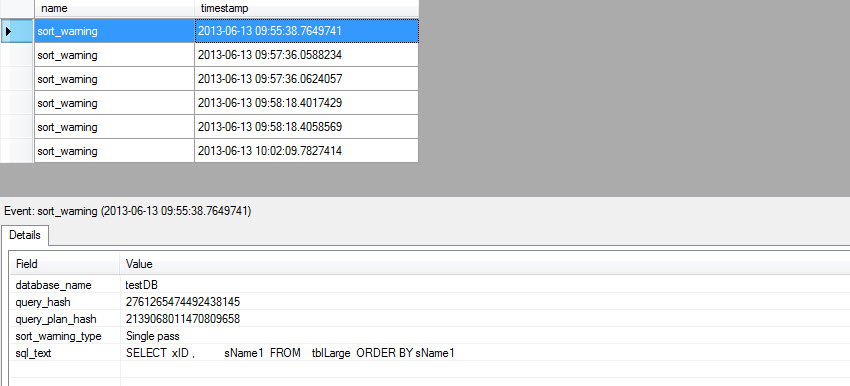
Using Extended Events (SQL 2012), SQL Profiler Trace and Execution Plan, “sort warning” are easily detectable and following are some outputs.

Figure#1: sort warning using Extended Events in SQL 2012


Figure#2A: sort warning detection using Execution Plan


Figure#2B: sort warning detection using Execution Plan

  
Figure#2: sort warning detection using SQL Profiler Trace


Learn More: